Send
How to Send Funds From Your Wallet
You can send your funds to another wallet at any time. Follow the steps below.
Step 1: Open Your Portfolio
- Go to your Portfolio on the platform.
- Click the Send button (top left).
This will open the send screen.
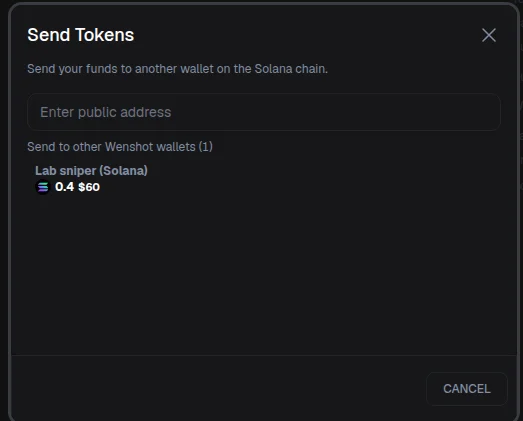
Step 2: Get the Receiving Wallet Address
- Open the wallet where you want to receive the funds (for example, Phantom Wallet, or even Binance).
- Click Receive.
- Copy the wallet address.
This is the address where your funds will be sent.
Step 3: Enter Transaction Details
- Paste the receiving wallet address into the address field.
- Select the token you want to send
- Example: Select Solana (SOL) when sending to a Solana address.
- Enter the amount you want to send.
- For testing, it’s best to start with a small amount (for example,
0.01 SOL).
Danger
Ensure that you send your tokens exclusively to the right wallet address on the right chain. Any other transactions made to different addresses will result in permanent loss and cannot be refunded.
Step 4: Review Gas Fees
- Below the amount, you will see the estimated gas fee.
- Gas fees are the cost required to process your transaction on the blockchain.
- These fees depends on the network.
Warning
Make sure to have enough assets (like BNB or SOL) to cover the transaction gas fee.
Step 5: Send and Confirm
- Click Send. You must have 2FA enabled.
Step 6: Transaction Confirmation
- After sending, you will see a transaction summary.
- This means the transaction has been sent to the blockchain.
- The transfer will complete once it is confirmed on the network.
Info
The transaction initiation may take a few minutes. Check on the block explorer to track the transaction status.
Helpful Tips
- ✅ Always double-check the wallet address
- ✅ Make sure the token and network match
- ✅ Send a small test amount first
- ❌ Never send funds to the wrong network or address