History
The History tab of the Trades dashboard lists every trade that is no longer open: positions closed by a take profit, a stop loss or a manual sell, trades you cancelled, and snipes that failed to execute.
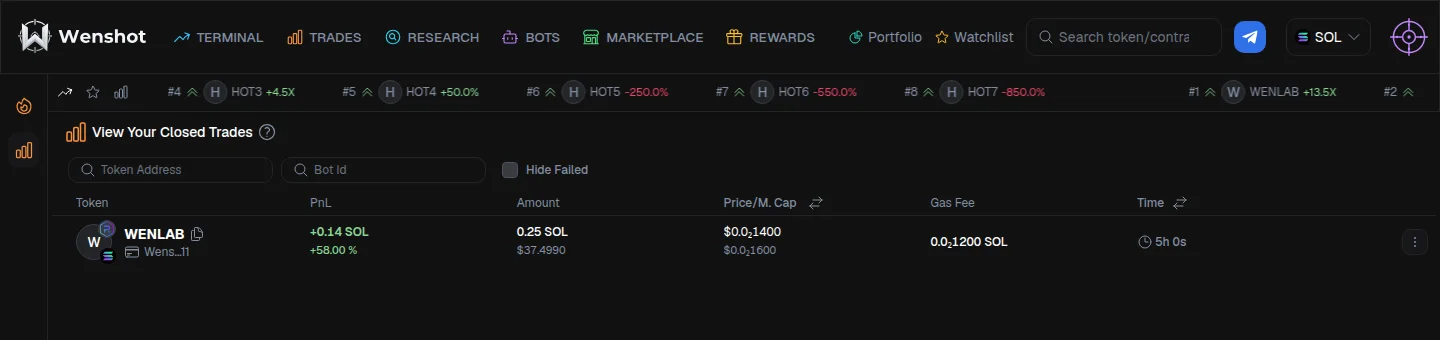
What each row shows
- Token: the token and the wallet that traded it
- PnL: the realized profit or loss of the trade, in the quote asset and as a percentage of the amount invested
- Amount: the amount invested and its USD value
- Price / M. Cap: the average entry price on top and the average exit price below; use the header toggle to switch between price and market cap
- Gas Fee: the total network fees paid for the trade, buys and sells included
- Time: how long the position stayed open; use the header toggle to show the dates instead
The menu at the end of each row lets you reactivate the trade with the same settings, duplicate it to adjust the settings before buying again, or share the result.
Filters
Narrow the list by token address or by bot id to see the trades of a single bot. Tick Hide Failed to leave out the snipes that never executed.
Which trades end up here
- Closed: the position was fully sold, by a take profit, a stop loss, a manual sell or the rug-pull protection
- Cancelled: you cancelled the trade before it executed, or your security settings cancelled it
- Failed to snipe: the buy transaction could not be executed; the reasons are listed in Transaction errors
A position that is only partially sold stays in Open Trades until its last token is sold.