Create a Wallet
Before you begin trading, it is necessary to set up your wallet. Visit your Portfolio and create a new wallet. Once you create a wallet, it will be EVM-compatible and Solana compatible.
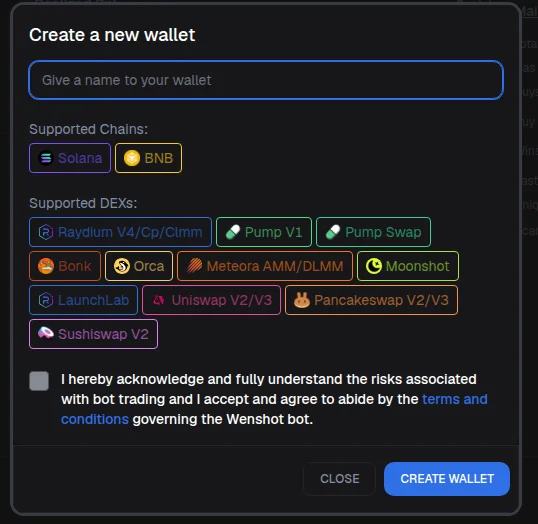
Follow those steps to create a new wallet:
- Give a name: this will be used to identify your wallet when trading.
- Accept Terms & Conditions: by checking the box, you accept Wenshot Terms and Conditions.
- Store your Private and Mnemonic Keys: make sure to copy your keys and store them in a safe location. This is the only way to access your funds.
- Confirm: confirm that you've stored your Private and Mnemonic keys.
Warning
Keep your private keys safe by storing them securely—writing them down on paper is one of the safest methods. Never share your keys with anyone, as they grant full access to your assets. Remember, the Wenshot team will never ask for your private keys or mnemonic phrases.
Warning
Your private or mnemonic keys are the only way to access your wallet, through hot-wallets services like MetaMask. If you lose them, please note that the Wenshot team cannot recover them for you. Keep them safe!