Tokens Presets
Using Wenshot Presets (Token Whitelisting)
Each bot can trade only whitelisted tokens, which you can add either manually or use Wenshot presets to automate the process, based on filters and parameters.
A preset is a group of settings defined by you that filters tokens on a specific blockchain and supported DEXes, then automatically whitelists the tokens that match your criteria.
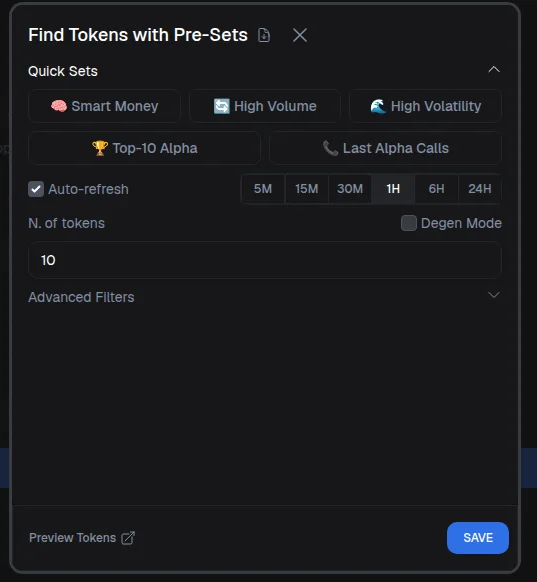
You can access presets settings by clikcing on presets.
Warning
Wenshot does not make trading decisions for you—all selections and actions are strictly based on the rules and parameters you configure.
Quick Presets
Wenshot provides ready-to-use presets to get started quickly. Examples include:
- Top 10 Alpha: the top-performing tokens of the current Alpha season
- Last Alpha Called: tokens recently called in the Alpha Program
- Presets based on volatility, volume, or smart wallet inflow
These presets let you start trading without manual filtering.
Warning
Even when using default presets, we strongly recommend reviewing the filters before saving, to ensure they match your risk profile and trading strategy.
Auto Refresh
Auto Refresh controls how often the preset updates the whitelist:
- Disabled: the token list stays fixed
- Enabled: tokens are re-fetched automatically (every 5 minutes or every hour, depending on your setting)
This keeps your whitelist constantly updated and aligned with your filters.
Degen Mode
Degen Mode allows whitelisting tokens flagged as risky by Wenshot.
Warning
This option is not recommended unless you fully understand the risks involved.
Number of Tokens
You can choose how many tokens are whitelisted, from 1 to 100.
Info
Most traders select 50–100 tokens to diversify effectively.
Filter Panel
The filter panel lets you fine-tune token selection.
- Timeframe: defines the period used for all filters (for example, 1h, 6h, or 24h).
- Sort Tokens: choose how tokens are ranked when whitelisting, such as by Volume, Smart Wallet Volume, or Smart Wallet Flow (net inflow from smart wallets).
- Token Age: filter tokens by age in minutes. Common minimum values range from 60 to 600 minutes to reduce rug-pull risk.
- Market Cap & Liquidity: set minimum thresholds (for example, if set to minimum $500k market cap and $100k liquidity, the preset will exclude all tokens below those amounts).
- Volume: require a minimum and maximum traded volume over the selected timeframe.
Advanced filters like Price Change and Volatility Index are covered separately.
Security Filters
Wenshot labels wallets as smart, risky, or suspicious based on on-chain behavior. These labels power advanced safety filters.
You can require:
- A minimum number of smart wallets buying and selling
- A minimum total amount bought by smart wallets
- A maximum percentage of risky wallets (20% is a common setting)
- A maximum percentage of fresh wallets (new wallets with no history), often capped around 50%
These filters help reduce exposure to scams and manipulated tokens.
Final Selection & Review
You can preview the results before saving, or save directly to whitelist the tokens. When Auto Refresh is enabled, the bot will re-evaluate tokens automatically and keep the whitelist up to date.
You can remove tokens manually, clear the entire list, or click on any token to view detailed statistics and perform due diligence. You can also expand the list to see all tokens with live values, similar to the Hot Tokens view.