Trading Presets
Wenshot trading presets let you save your manual trading settings and reuse them instantly with one click. This helps you trade faster and stay consistent.
Creating and Using Presets
In the top-right panel in the Wenshot Terminal, you can access your trading presets at any time. After setting up a trade, you can save all your trading settings into a preset and reuse it later, so you don’t need to configure the same settings again.
Wenshot provides a default trading preset, but most traders create their own based on personal preferences.
Info
It’s recommended to create separate presets for each chain (for example, Solana and BNB Chain), since fees and trade sizes differ. You can create up to 10 presets and switch between them depending on your strategy.
Managing Presets
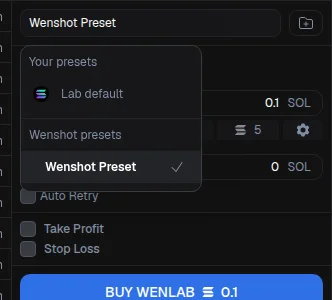
From the preset menu, you can:
- Change preset
- Delete a preset
- Create a new preset based on current trading settings
- Overwrite a preset to save changes
Using Presets in Research
Presets are also available in the Research section. When using Wenshot’s AI research tools and you spot an opportunity, you can buy instantly with a single click using your preset.
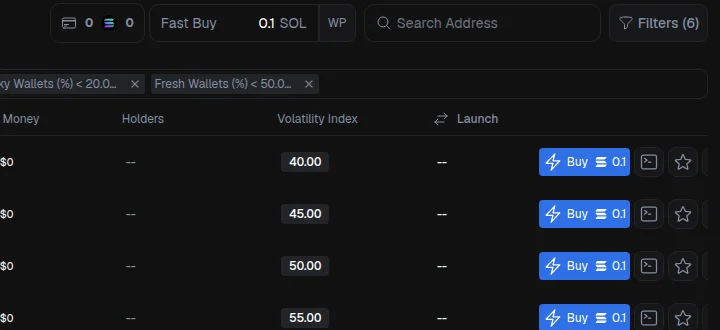
You’ll see your fast buy settings, including the wallet in use, the buy amount, and the preset initials. You can quickly edit the preset, save changes, or create a new one by assigning a name. Presets can be used to trade instantly from any Research page, allowing you to react quickly and capture opportunities as soon as they appear.